
The screen printing process has five steps: artwork prep, screen making, ink mixing, printing, and clean up. Each color in your design gets its own screen, ink is pushed through that screen onto the shirt with a squeegee, and the print is cured in a dryer so it lasts. That's why screen printing is priced by color count and quantity, and why it's the go to method for orders of 12 or more. The infographic below shows the whole thing at a glance.
After publishing our full guide to how screen printing works, which gets into serious detail, we needed a version for people short on time. So here's the whole process in one graphic, followed by a plain English walk through of each step.
What are the five steps of the screen printing process?
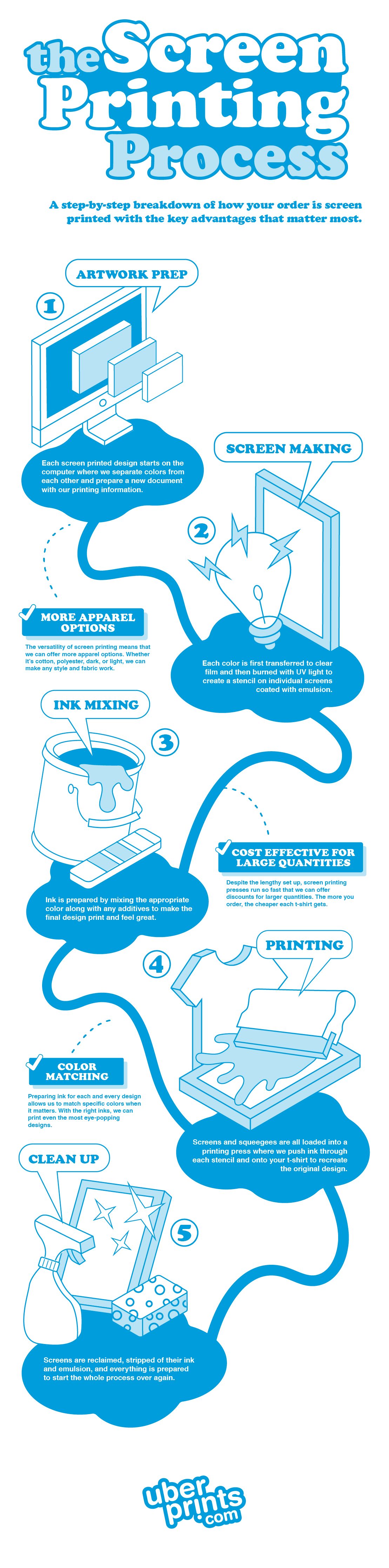
- Artwork prep. Every screen printed design starts on a computer. Our art department separates each color in your design into its own layer and sets up a print file with the exact size and placement. This is also where common issues like off center art get fixed automatically.
- Screen making. Each color layer is printed onto clear film. That film is laid over a screen coated in light sensitive emulsion and exposed to UV light, which hardens everything except the design. Wash it out and you've got a stencil for that one color.
- Ink mixing. Ink is mixed to match the color in your design, including exact Pantone matches when it matters. Additives can be mixed in to change how the ink feels on the shirt or how it prints on dark fabric.
- Printing. Screens and squeegees are loaded onto the press. Each color gets pushed through its stencil onto the shirt in order, then the shirt runs through a dryer to cure the ink so it's wash safe.
- Clean up. After the run, screens are reclaimed. Ink and emulsion are stripped off so the screen can be coated and reused for the next order.
Why does the process matter for your order?
Because it explains the two things people ask most: why price depends on colors, and why there's a 12 piece minimum.
| Process step | What it means for you |
|---|---|
| One screen per color | Each additional ink color adds setup, so fewer colors cost less |
| Setup is front loaded | Once screens are made, the press runs fast, so bigger orders cost less per shirt |
| Ink is mixed per job | Exact color matching is possible, and specialty inks are an option |
| Cured in a dryer | Prints hold up to hundreds of washes |
Screen printing at UberPrints is available on orders of 12 or more pieces per design, with up to 8 ink colors per print location. Fewer than 12? Your order prints digitally instead, with no minimum. Our decoration methods overview and the side by side comparison show when each one makes sense.
What are the advantages of screen printing?
- More apparel options. Screen printing works on cotton, polyester, blends, performance fabric, dark shirts, light shirts. If we sell it, we can almost certainly screen print on it. Browse the full short sleeve t-shirt catalog to see the range.
- Cost effective for large quantities. Setup takes time, but the press is fast once it's running. That's why bulk pricing kicks in and keeps dropping as your quantity climbs. It's the reason bulk custom t-shirts for events, teams, and companies almost always screen print.
- Color matching. Since ink is mixed for every job, we can match a specific brand color instead of approximating it. Bright, opaque colors on dark shirts are a screen printing specialty.
- Durability. Cured plastisol ink is tough. Your design should outlast the shirt.
How should you prepare artwork for screen printing?
Vector files (.ai, .eps, .pdf) are ideal because they scale without losing quality. If you're uploading a raster image like a .png or .jpg, aim for 150 dpi or better at the actual print size. Keep your color count as low as the design allows, and remember that fine gradients and photos are better suited to digital printing. The uploaded image requirements page has the full checklist.
How long does screen printing take?
Screen printed and embroidered orders are guaranteed to ship within 7 days, and most ship in 4–5 business days. Standard shipping is free and takes 1–5 business days. Need it faster? Rush delivery is guaranteed to arrive within 7 days. Details are on the shipping and delivery page.
Ready to screen print your design?
Head to our custom screen printing page to see pricing factors, upload your art, or start from a template.
Related guides
- Screen Printing: Everything You Need to Know
- Screen Printing vs Digital Printing: Everything You Need to Know
- How Price Is Calculated for Screen Printed Orders
FAQ
How many colors can be screen printed on one shirt?
Up to 8 ink colors per print location at UberPrints. Each color needs its own screen, so more colors means more setup and a higher per shirt price. Most great t-shirt designs use one to three colors, which keeps the print crisp and the cost down.
What is the minimum order for screen printing?
12 pieces per design. Below that, the setup cost doesn't make sense, so smaller orders print digitally with no minimum. If you're on the fence, ordering 12 usually costs about the same as 8 or 9 digital pieces once bulk pricing applies.
Does screen printing last?
Yes. The ink is cured in a dryer at high heat, which bonds it to the fabric. A properly cured screen print holds up through hundreds of washes. Wash inside out in cold water and skip the high heat dryer setting to keep it looking new longer.
Can you screen print on polyester or performance shirts?
Yes. Screen printing works on 100 percent polyester, performance blends, and other synthetics, which is one reason it offers more apparel options than digital printing. Special inks and techniques handle the dye migration issues that can affect polyester with other methods.